Our product · New · Contact for Details
Nexvora ShopPOS: retail billing and inventory software
Installed on your shop’s own computer, not in the cloud. Built by NexvoraSoft in Karachi for grocery, general, cosmetics and stationery stores: fast billing at the counter, stock you can trust and udhaar under control.
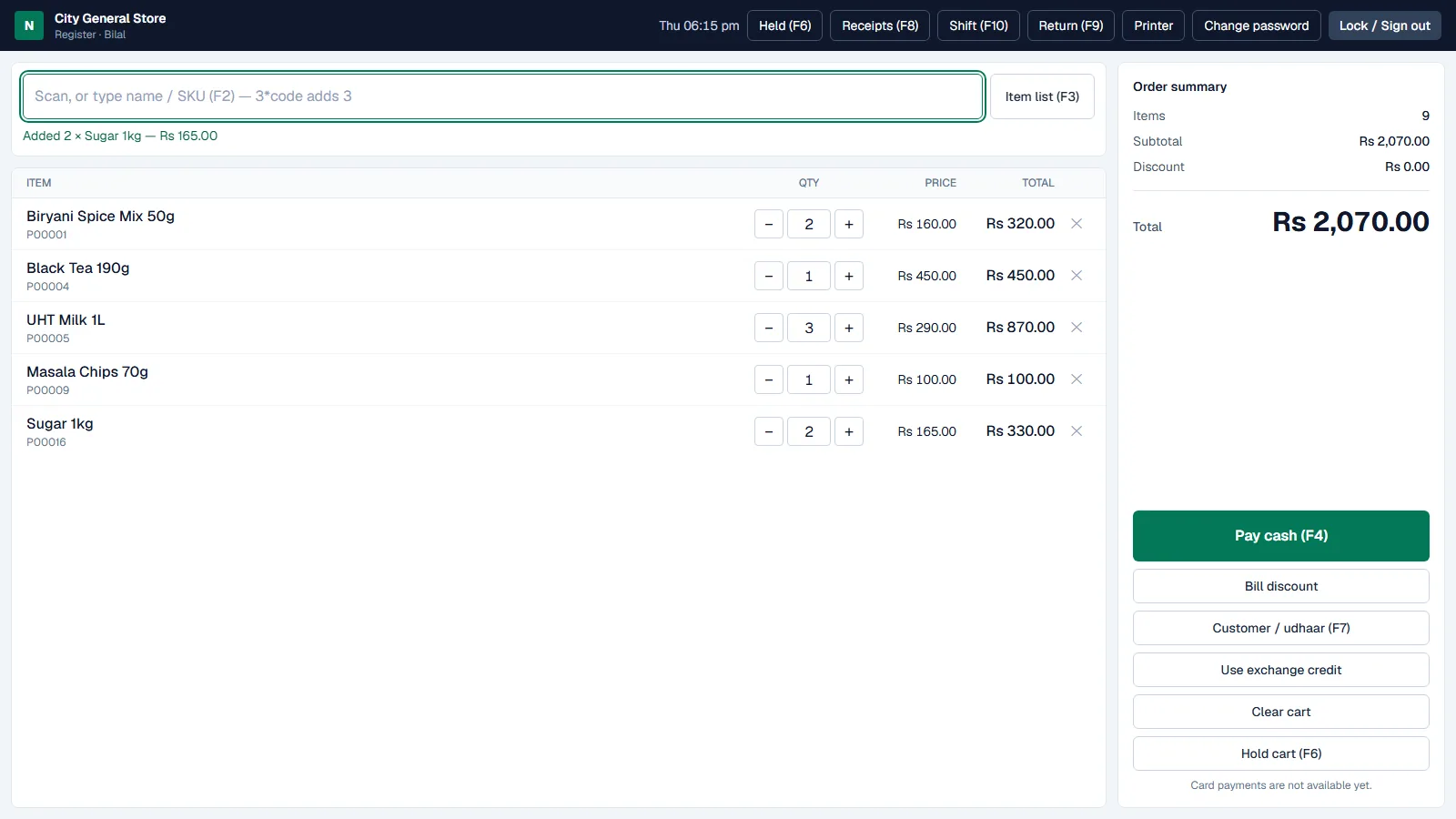
Screens shown with demo data: a fictional store, generic products and made-up customers.
Made for the shop counter.
A point of sale and shop system for grocery, general, cosmetics and stationery stores. Fast billing with a barcode scanner or the keyboard, stock that only changes through purchases, sales and recorded adjustments, profit you can see, udhaar with limits, returns and exchanges tied to the original receipt, and a separate till screen where cashiers never see costs or settings. It runs on the shop’s own computer, not in the cloud.
How it runs
Installed in your shop, not in the cloud.
On your computer
ShopPOS is installed on one computer in the shop, which keeps the database and runs as a Windows service — in the background, without anyone signed in, and again after every restart.
Tills in the browser
Other computers on the shop’s network open ShopPOS in a web browser. Each cashier signs in with their own account and works on the till screen.
Your data stays with you
Sales, stock and customer records are kept in SQL Server Express on the shop’s computer. A backup runs every night, and updates take a backup before they change anything.
What is inside
Fast till
Scan or type a name, SKU or barcode; 3*code adds three. Keyboard shortcuts for pay, hold, customer, receipts and returns, held carts that come back exactly once, and cash payment with the change worked out.
Receipts & printing
80 mm or 58 mm thermal receipts, or full-page invoices, with your logo. Printing through the browser, or directly to ESC/POS receipt printers (paper cut, cash drawer) and Windows printers with the ShopPOS Print Agent. Reprints need a reason.
Stock you can trust
Every change is a ledger entry linked to its purchase, sale, return or adjustment, and a ledger check confirms the balances. Reorder levels flag low and out-of-stock items.
Purchases & suppliers
Receive stock with supplier and cost, average cost kept up to date, and posted purchases reversed or corrected with a reason instead of edited.
Customers & udhaar
Put part or all of a bill on a customer’s account within their limit, collect payments with a printed receipt, and see a ledger for every customer.
Returns, exchanges & voids
Returns are linked to the original receipt and refunded at what was paid. Exchange credit pays for new items, and a cashier’s return or void waits for a manager.
Discounts with control
Line and bill discounts up to the owner’s cashier limit; anything more, or a price change, needs a manager to approve at the till.
Shifts & cash
Each cashier opens a shift with counted cash and closes it with a blind count; the system shows expected, counted and the difference.
Reports
Today’s net sales, gross profit, inventory value and udhaar on the dashboard; daily sales, products, cashiers, returns, shifts and stock valuation for any date range, with CSV export.
Staff & security
Owner, manager and cashier roles checked on the server, sign-in lockout, idle lock at the till and an audit log of every sensitive action.
Install & backup
One setup file installs ShopPOS as a Windows service on the shop’s computer; tills on the shop network open it in a browser. Nightly backups, and updates that back up first and roll back if needed.
Screens from ShopPOS
Screens shown with demo data: a fictional store, generic products and made-up customers.
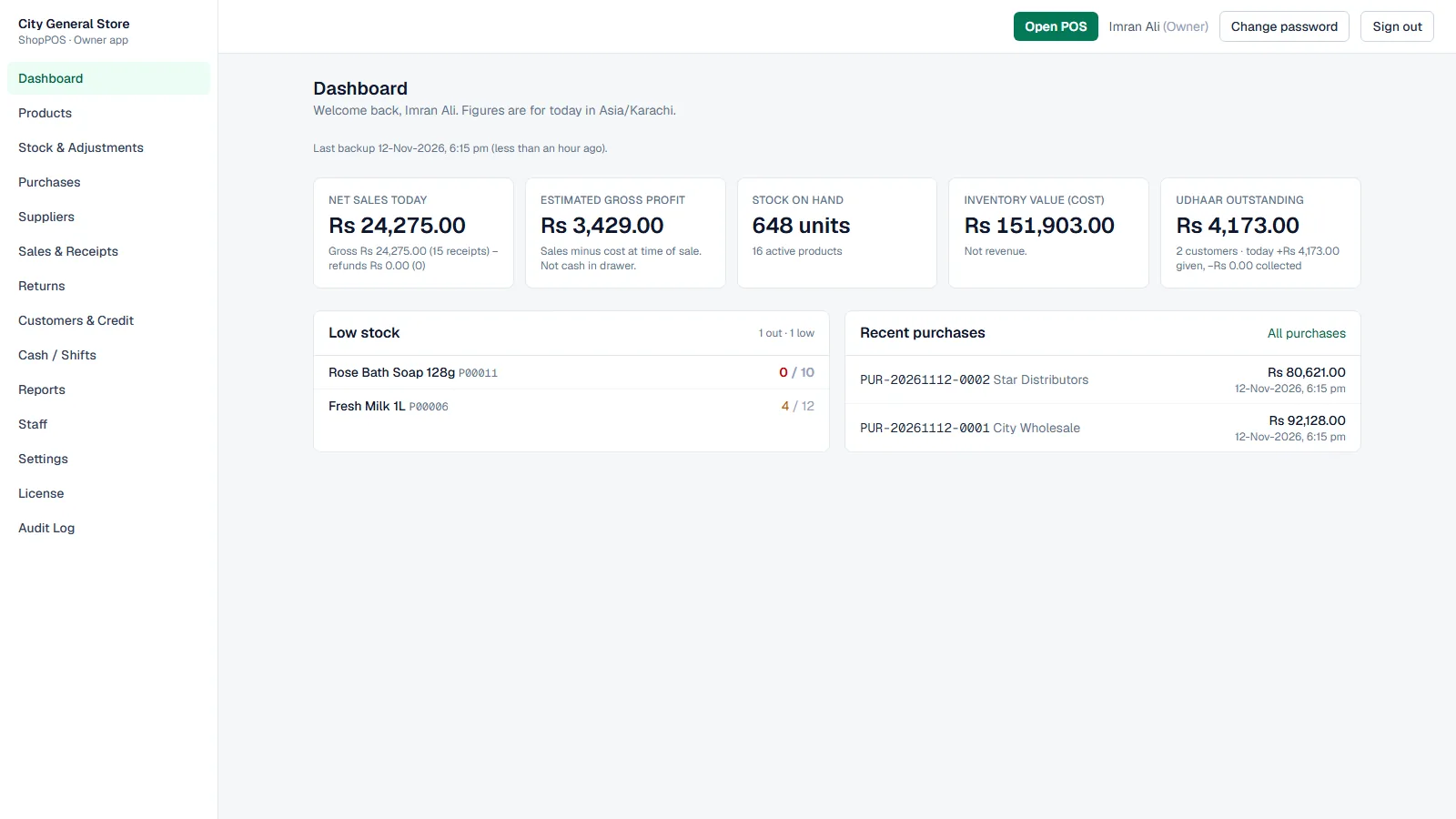
Owner dashboard 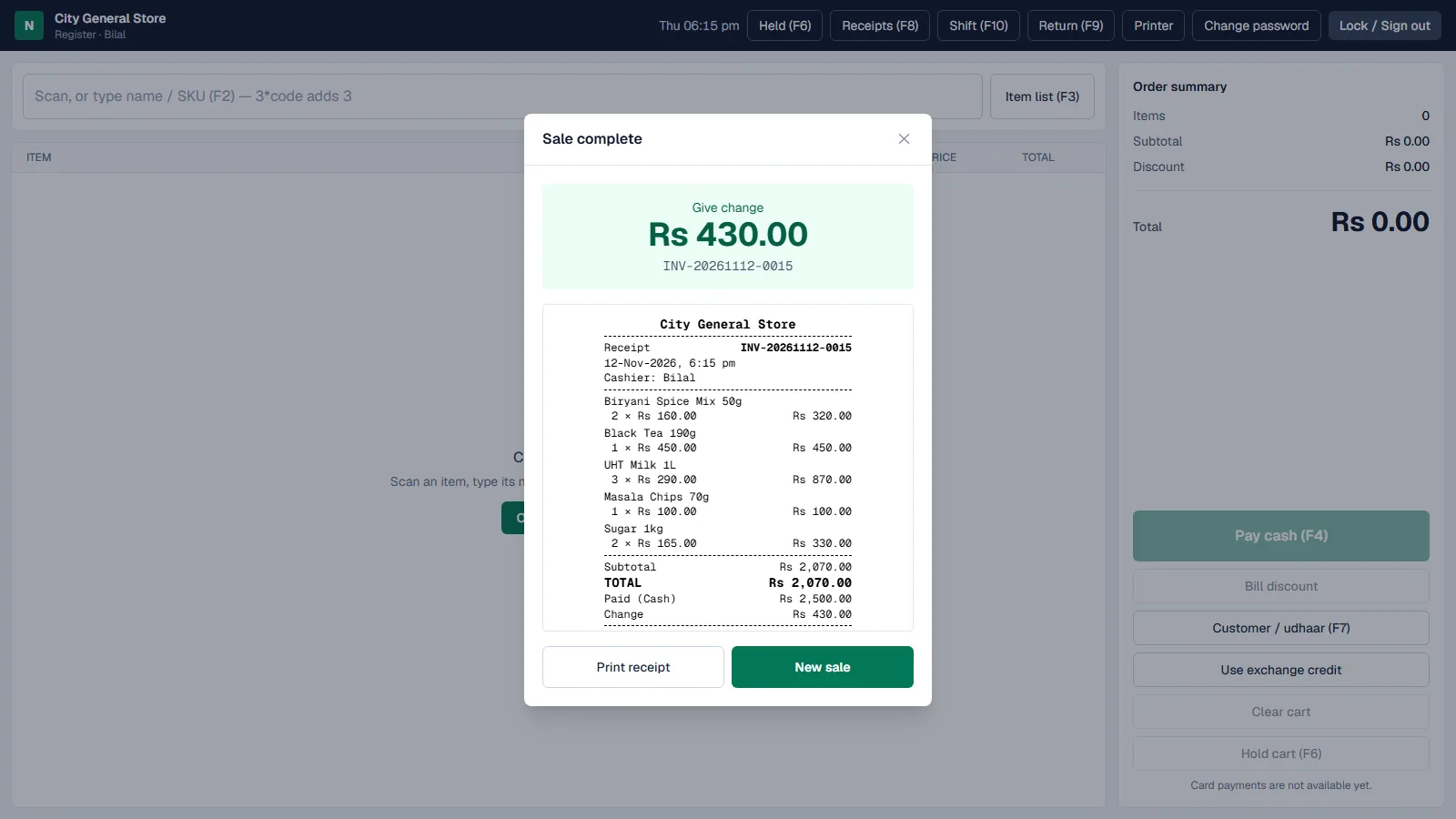
Sale complete and receipt 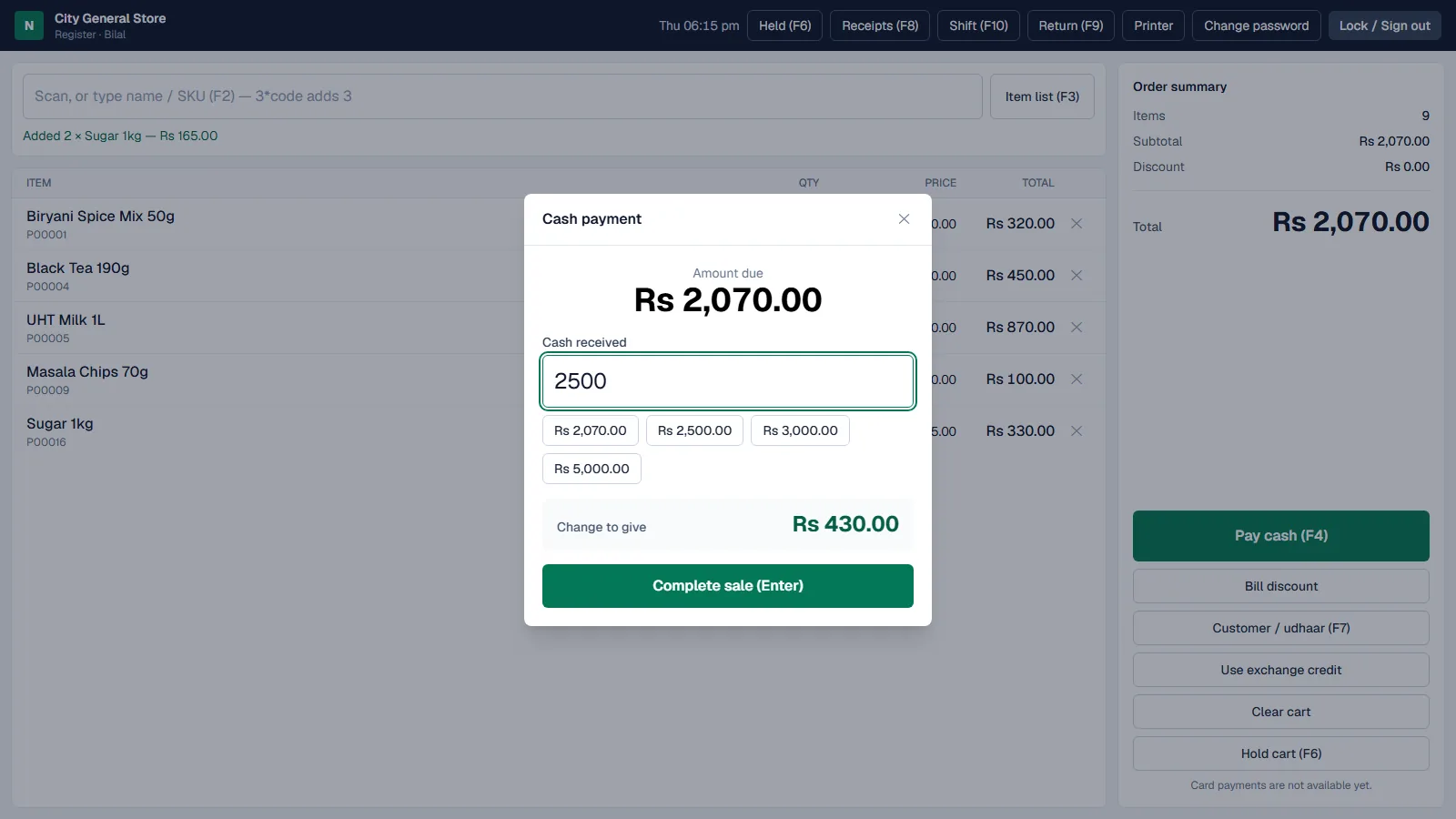
Cash payment 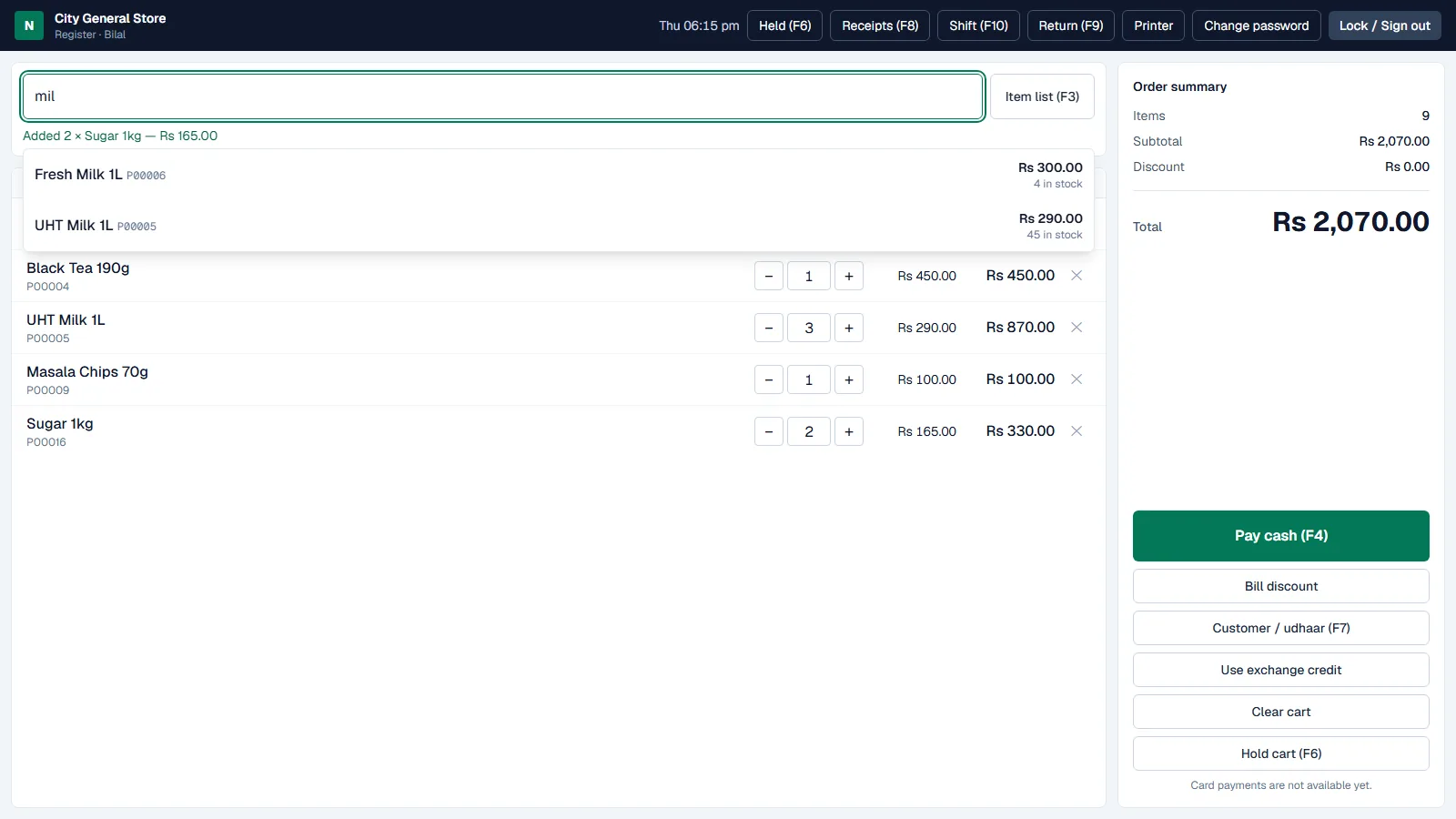
Search at the till 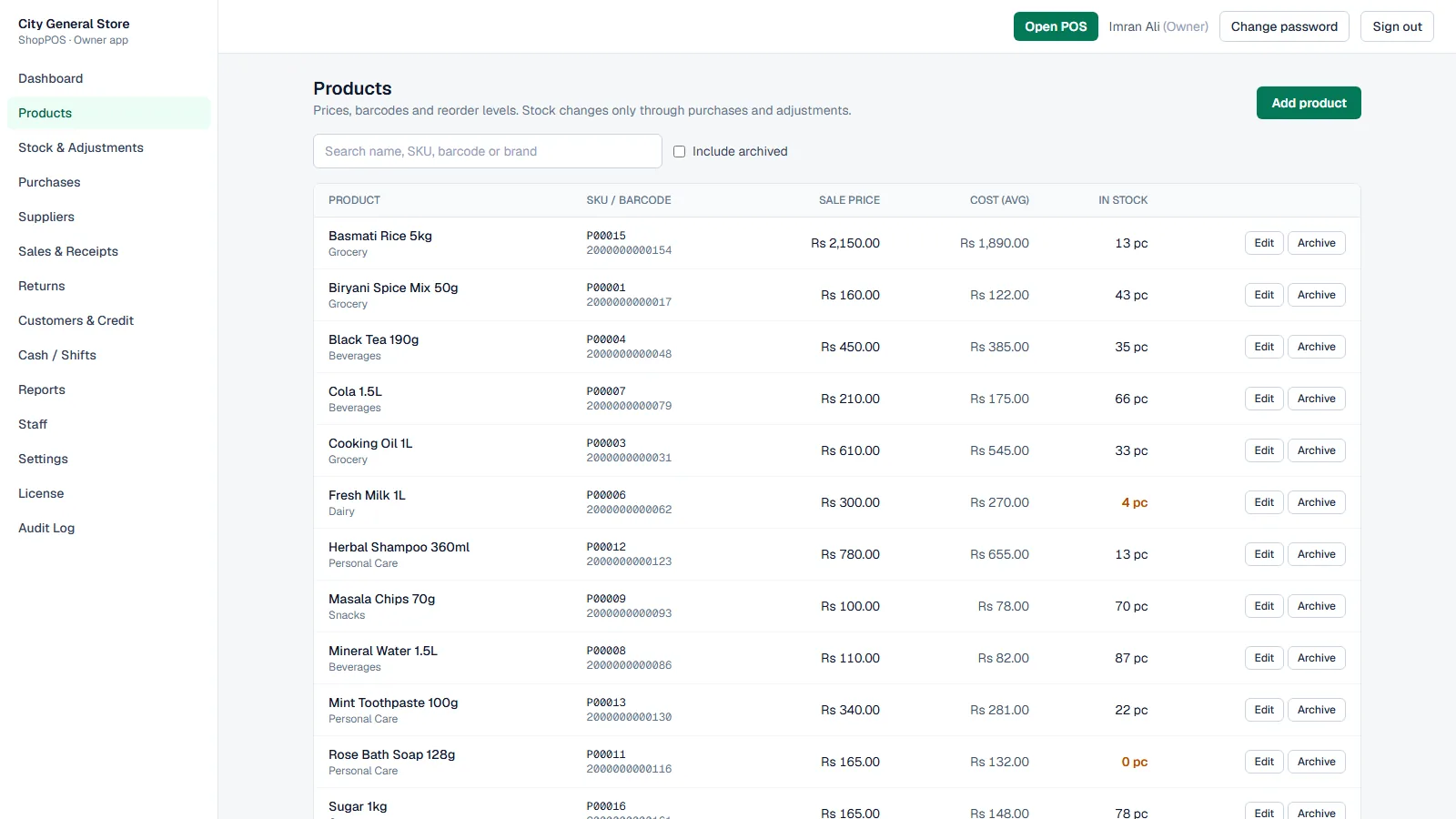
Products 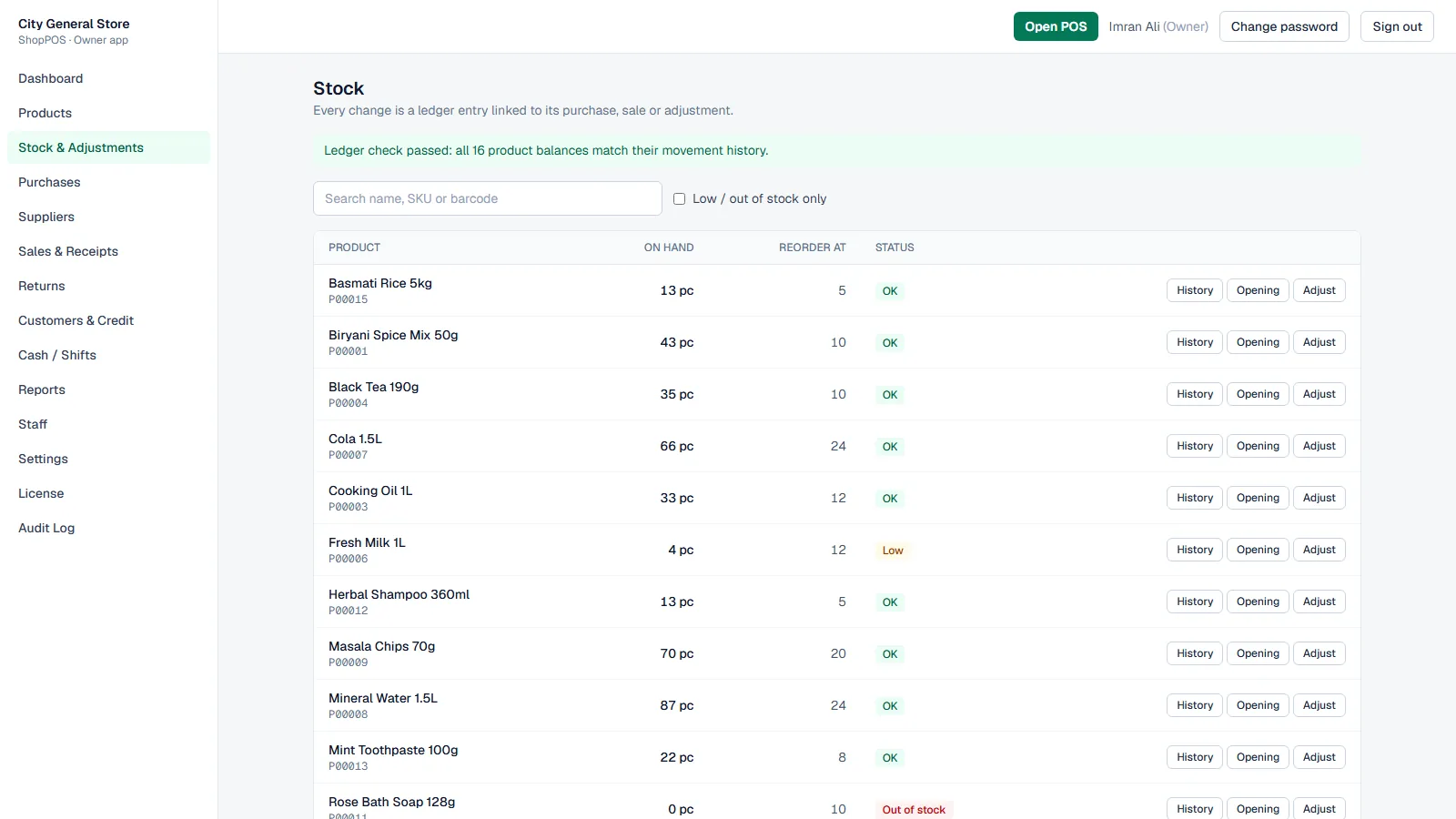
Stock and ledger check 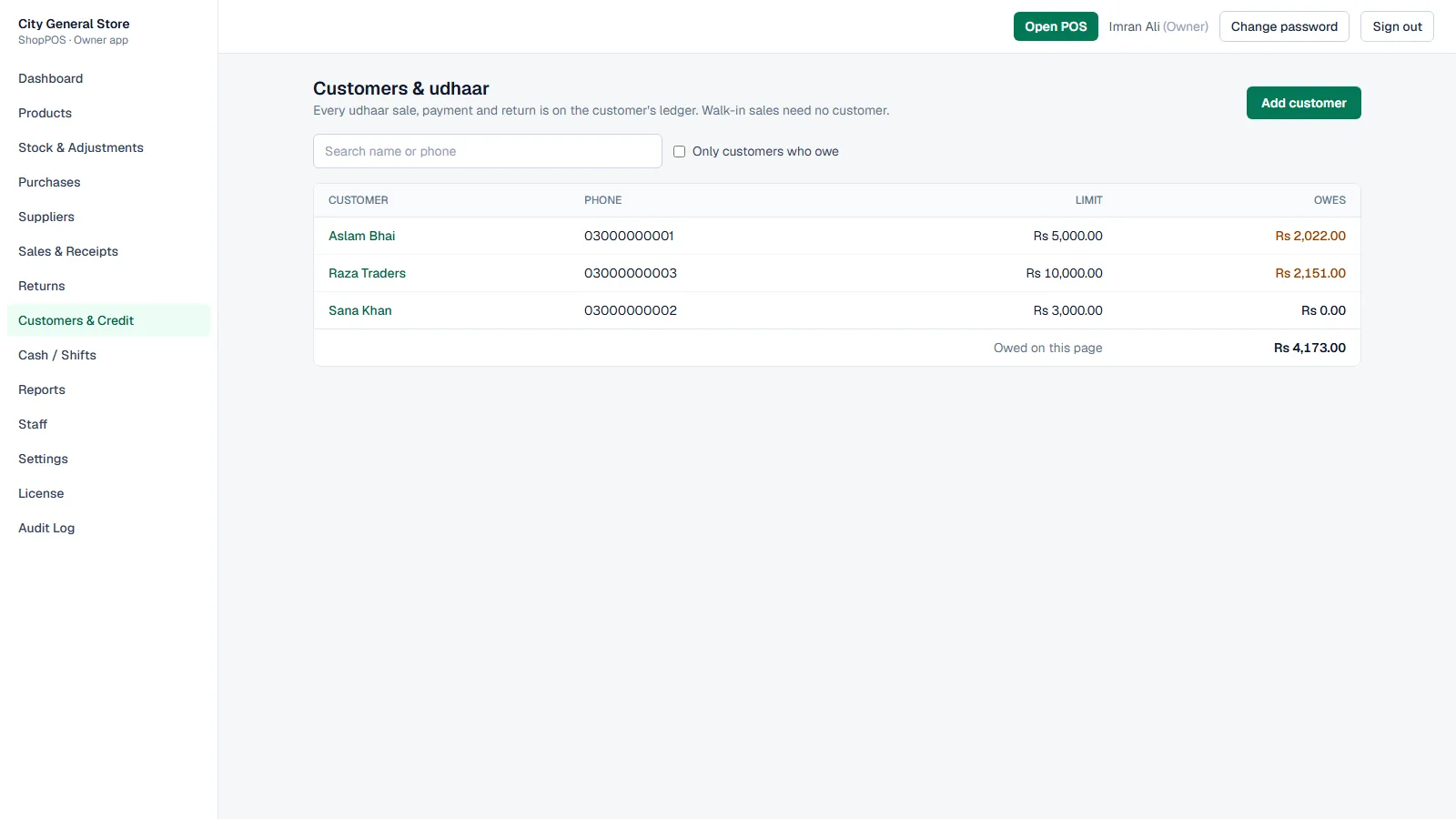
Customers and udhaar 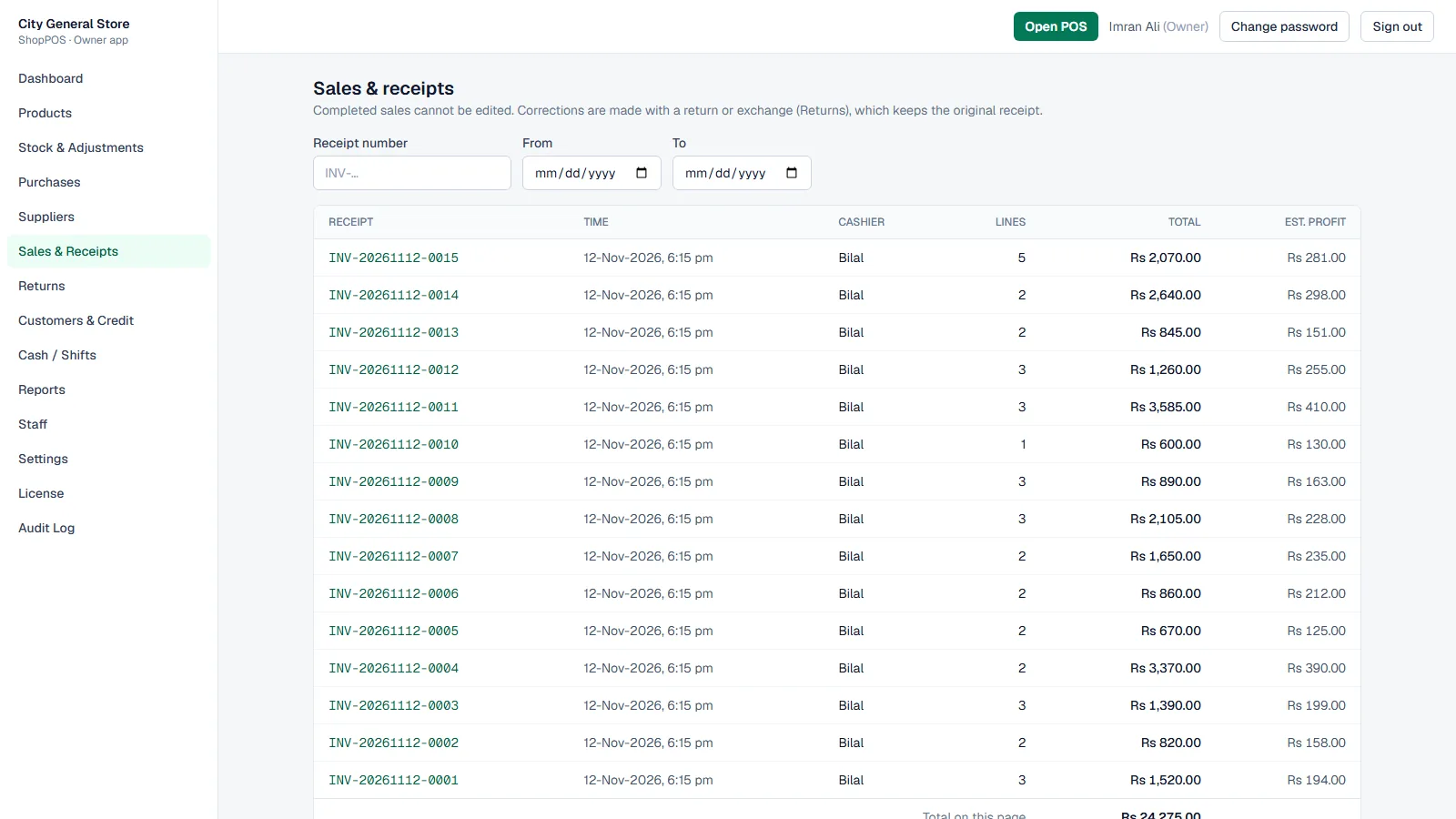
Sales and receipts
Latest updates
- Direct printing through the ShopPOS Print Agent — ESC/POS with paper cut, cash drawer and logo, or a Windows printer
- Barcode scanning in keyboard mode, with scans reaching the till from anywhere on the screen
- Hold and resume carts, kept on the server so a refresh or another till can bring them back
- Void a whole sale in the same shift, with a manager’s approval for cashiers
- Reverse or correct a posted purchase without losing its history
- Udhaar limits enforced at the till, including “all on udhaar”
- Blank SKU gets an automatic product code
Built with
- ASP.NET Core (.NET 10)
- SQL Server Express
- Next.js
- Windows service
- ESC/POS printing
Made for
- Grocery and general stores
- Cosmetics, stationery and convenience shops
- Shops with one or more cashiers on a local network
Which one do you need?
ShopPOS, Workspace or a custom ERP
Nexvora ShopPOS
For a retail shop’s counter: billing, barcode scanning, stock, udhaar and cashier shifts. Installed on the shop’s own computer.
Nexvora Workspace
For running a business online: leads, quotations, invoices, accounting, HR and payroll in the cloud or on your server. It has products and stock, but no till.
About Nexvora WorkspaceCustom ERP development
When your process does not fit a ready product: we design and build an ERP around your orders, production and approvals.
About Custom ERP development
Questions about ShopPOS
Is Nexvora ShopPOS cloud software?
No. ShopPOS is installed on a computer in your shop and runs on your local network. Tills open it in a web browser, but your sales and stock are kept on the shop’s own computer, not on our servers.
What kind of shops is it for?
Grocery and general stores, cosmetics, stationery and convenience shops — one location with one or more cashiers. Multiple branches and warehouse transfers are not part of ShopPOS.
Which barcode scanners and receipt printers can I use?
ShopPOS is built for barcode scanners in keyboard mode and for receipt printers that use ESC/POS or a Windows printer driver; receipts can also be printed from the browser. We check your own scanner and printer with you before you start selling.
What do I need to run it?
A Windows computer in the shop for ShopPOS and its database (SQL Server Express), and a web browser on each till. The setup file installs the rest.
Can cashiers see purchase costs and profit?
No. Cashiers work on the till screen only. Costs, profit, staff, settings and stock corrections are for the owner and managers, and the server checks every request, not just the screen.
Does it handle udhaar (customer credit)?
Yes. Part or all of a bill can go on a named customer’s account within their credit limit. Payments are collected with a receipt, and each customer has a full ledger.
How is ShopPOS different from Nexvora Workspace?
ShopPOS is for the shop counter: fast billing, stock, udhaar and shifts on the shop’s own computer. Nexvora Workspace is for running the business — sales, invoices, accounting, HR and payroll — and has no till.
How do I get it or see it?
Contact us with your shop type and number of tills. We will tell you what is needed and how to get started.
Let's talk
Ready to start your project?
Tell us how your operation runs today. We'll show you what software can take off your team's plate.